Passing by value vs Passing by reference in C++

The concept of passing a variable to a function by value or by reference is somewhat confusing to beginners. It was difficult for me to comprehend until I learned the essential elements of a variable.

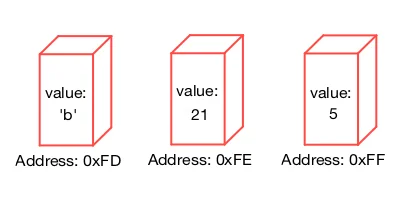
A variable is a named memory location that stores a value. However, there is more to this. A variable is composed of a rvalue (right value) and a lvalue (left value). The rvalue represents the value stored in the memory location. Whereas, the lvalue designates the address of the memory location.

When you pass a variable to a function, you either pass the variable's rvalue or lvalue. If you pass the rvalue to a function's argument, you are passing the variable by value. However, if you pass the variable's lvalue, you are passing the variable by reference. Passing a variable by reference equates to saying "passing its address to the function."

So what's the point of all of this? The point is this: Passing the address of a variable is the only way to have a function modify the content of a variable.

Let's talk about the differences between each method.

Difference in function declaration

Functions that receive a value through its argument are declared as:

int add(int a);

In practice, the function is use as follows:

int main(){

int myVariable=2; //1. define a variable
int myAnswer=add(myVariable); //2. pass the variable by value

return 0;
}

In line 1, you define a variable named 'myVariable.' In line 2, the variable is "passed by value" to the function 'add.'

In contrast, functions that receive an address through its argument are declared as:

int add(int *a);

The argument is declared as a pointer since pointers can receive addresses.

In practice, the function is use as follows:

int main(){

int myVariable=2; //1. define a variable
int myAnswer=add(&myVariable); //2. pass the variable by reference

return 0;
}

In line 1, you define a variable named 'myVariable.' However, in line 2, the variable is "passed by reference" to the function 'add.' The symbol '&' means "The address of."

Difference in function definition

There are differences in the function definition for each method. In a "pass by value" method, a function is defined as:

int add(int a){

int b=a+1; //1. increment the incoming value by 1

return b; //2. return the value of b
}

In the code snippet above, the function increments the value of 'a' by 1 (see line 1). Line 2, returns the value of b.

In a "pass by reference" method, a function is defined as:

int add(int *a){

int b=*a+1; //1. dereference the pointer and increment the value by 1

*a=5; //2. modify the value of the variable

return b; //3. return the value of b
}

Line 1 dereferences the pointer 'a.'; it accesses the value the pointer 'a' points. The value is then incremented by 1.

Line 2 modifies the value the pointer 'a' points to and sets it equal to 5. Line 3 returns the value of b.

Examples of each method

Let's go through a complete example of each method:

"Pass by value" method

In the code snippet below, lines 1 and 2 declare and define the function 'add.'

Line 5 shows the start of the 'main()' function. Line 6 defines a variable 'myVariable.' This variable is "passed by value" to the function 'add' in line 7.

Lines 8 and 9 prints the value of 'myAnswer' and 'myVariable.'

int add(int a); //1. declare a pass by value function

//2. define a pass by value function
int add(int a){

    int b=a+1; //3. increment the incoming value by 1

    return b; //4. return the value of b
}

//5. main function
int main() {

    int myVariable=2; //6. define a variable

    int myAnswer=add(myVariable); //7. pass the variable by value

    std::cout<<myAnswer<<std::endl; //8. print the value of myAnswer

    std::cout<<myVariable<<std::endl; //9. print the value of myVariable

    return 0;
}

When you run this program, the output of 'myAnswer' is 3, and 'myVariable' is 2. As expected, the function did not change the value of 'myVariable.'

"Pass by reference" method

In the code snippet below, lines 1 and 2 declare and define the function 'add.'

Line 6 shows the start of the 'main()' function. Line 7 defines a variable 'myVariable.' This variable is "passed by reference" to the function 'add' in line 8.

Lines 9 and 10 prints the value of 'myAnswer' and 'myVariable.'

int add(int *a); //1. declare a pass by reference function

//2. define a pass by reference function
int add(int *a){

    int b=*a+1; //3. dereference the pointer and increment the value by 1

    *a=5; //4. modify the value of the variable

    return b; //5. return the value of b
}

//6. main function
int main() {

    int myVariable=2; //7. define a variable

    int myAnswer=add(&myVariable); //8. pass the variable by reference

    std::cout<<myAnswer<<std::endl; //9. print the value of myAnswer

    std::cout<<myVariable<<std::endl; //10. print the value of myVariable

    return 0;
}

When you execute the program above, the output of 'myAnswer' is 3. However, 'myVariable' was modified and now equals 5.

The concept of "pass by value" vs. "pass by reference" may be difficult to grasp. In doubt always remember: "passing by reference" is the only way to have a function modify the content of a variable.

Hope this helps

Reference: C++ Pointers and Dynamic Memory Management

On this Mac, I developed a Game Engine

Two weeks ago, my Mac stopped working. I took it to the Apple store so they can diagnose the problem and unfortunately, the hard drive was no longer usable.

I lost all of my data and ended up buying a new Mac. Yes, I could have bought a new hard drive, but I've had this Mac for over six years, and it was time to get a new one.

My Mac with a blinking question mark after a reboot

My Mac with a blinking question mark after a reboot

When the Apple technicians told me that my Mac was no longer usable, I got sad. Not because I lost my data, but because I've had built a relationship with my laptop.

No, I am not weird. Let me explain.

Developing a Game Engine is hard. It takes a lot of dedication, persistence, and motivation. It took me over three years to develop a game engine. I had worked on it before heading to work, during lunch, after work and during the weekends. I can say that I worked over 15,330 hours on it.

Game Engine Development is not that hard technically-wise. It is hard psychologically-wise. You can spend three or four months of work only to implement a simple feature. You can spend two to three months trying to implement an algorithm and fail. I spent almost a whole year trying to get the Collision Detection System to work.

To be honest, I wanted to give up every single day of development. I was mentally tired. The enthusiasm that I had when I started development was gone. There was no desire in my heart to finish the game engine. I was spiritually tired.

And throughout all this time, my Mac was with me. It witness all the hours I put on it. It witnesses me dancing when I successfully implemented the first beta version of the engine:


It heard me swear in Spanish when the engine would crash. It saw me stared at it for hours pondering the idea of giving up. And it saw me when I screamed and jumped when I implemented the basic framework of the engine (Beta version v0.0.2):


It saw the game engine first demo:


The night before it died, I was preparing a demo to showcase version v0.0.3 of the engine. It was going to showcase the final piece of the engine framework. But my Mac never saw this demo working:


The next morning when I tried to turn on the computer, a folder with a blinking question mark showed up on my screen. I tried rebooting the computer, but it was useless.

I got sad when I realized my Mac was no longer usable. It may sound weird; I agree with you. But I am not sad because it no longer works. I am sad because, through this Mac, I learned to persist.

Thanks for reading.

Understanding Pointers in C++

Pointers have the fame of being hard to understand. However, this is not true. Pointers are simple to comprehend. What makes them confusing is how powerful and flexible they can be.

Imagine your computer's entire memory as a long row of containers; where each container has a unique address and can store a value.

A pointer is just container that has a unique address but instead of storing a value it stores the address of a variable. For example, the image below shows the address of the variable myChar stored inside the container myPointer.

The key point is this: A variable stores a value. A Pointer stores the Address of the variable.

Defining a Pointer

A Declaration announces a variable or function to the compiler so that it knows the data type before it compiles it. A Definition is a declaration that reserves storage.

So in the following code:

int main(){

char myChar='b'; //define variable myChar

return 0;
}

The variable myChar is being declared and defined. That is, memory space has been reserved for the variable, and it contains the value: 'b.'

To define a pointer, you specify the data type your pointer will be holding the address of and include the asterik symbol "*" before the pointer's name.

For example:

int main(){

char myChar='b'; //1. define variable myChar

char *myPointer;  //2. pointer definition

return 0;
}

Assigning an address to a pointer

To assign the address of a variable to a pointer, you use the "&" symbol as shown in line 3 below. In C++, the symbol "&" means "the address of."

int main(){

char myChar='b'; //1. define variable myChar

char *myPointer;  //2. pointer definition

myPointer=&myChar; //3. assigning the address of myChar to the pointer myPointer

return 0;
}

If you were to print the value of "myPointer" you will get the address of the variable "myChar."

Dereferencing a Pointer

You can retrieve the value a pointer points to by dereferencing it.

Let's go through a quick example:

int main(){

char myChar='b'; //1. define variable myChar

char myOtherChar; //2. define a variable myOtherChar

char *myPointer;  //3. pointer definition

myPointer=&myChar; //4. assigning the address of myChar to the pointer myPointer

myOtherChar=*myPointer;  //5. dereferencing myPointer

//myOtherChar now holds the value 'b'

return 0;
}

In line 5, we dereference the pointer using the dereferencing operator "*".

In other words, we accessed what the pointer points to, i.e., "myChar" and assigned the value of "myChar" to the variable "myOtherChar."

The dereferencing operator "*" is the same asterisk used to declared a pointer. However, its behavior differs depending on the position of the asterisk in a program. When the asterisk is not used in a declaration, it means "access what the pointer points to." I know this is confusing, but that is how it works in C++.

Hope this helps

Understanding Data Types in C++

How you represent an integer, a letter or a word in C++ differs. For example, representing the integer 23 requires the keyword int before the variable name:

int myNumber=23;

Representing the letter "L" requires the keyword char before the variable name:

char myLetter='L';

The keywords char and int along with float, bool and double are known as Data Types. A Data Type defines the set of possible values allowed in a variable and its memory size. These five data types constitute the fundamental data types in C++.

The Basic Integer Type: int

To represent an integer such as 201, -33, 1024, etc., C++ requires the keyword int before the variable name. For example:

int numberA=201;
int numberB=-33;
int numberC=1024;

The Floating Number Type: float

To represent a decimal number such as 21.3, 0.42, 0.10, etc., you must use the keyword float before the variable name. For example:

float numberA=21.3;
float numberB=0.42;
float numberC=0.10;

The Extended Precision Type: double

The double data type is similar to float but can store roughly twice as many significant digits than a float data type. To represent numbers such as -243.16, 2453345.2, C++ requires the keyword double before the variable name. For example:

double numberA=-243.16;
double numberB=2453345.2;

The Single Character Type: char

To represent a character such as 'a,' 'B,' '9', etc., use the keyword char. For example:

char myCharacterA='a';
char myCharacterB='B';
char myCharacterC='9';

The Boolean Data Type: bool

To represent the value of 0 or 1. Or true or false, use the keyword bool. For example:

bool myValueA=false;
bool myValueB=true;

Also, a data type specifies the memory allocated for the variable. The memory allocated is machine dependent, and it varies from machine to machine. For example, on my Mac:

  • An int takes 4 bytes of memory
  • A char takes 1 byte of memory
  • A float takes 4 bytes of memory
  • A double takes 8 bytes of memory
  • A bool takes 1 byte of memory

Hope this helps.

Understanding how Functions work in C++

In computer science, a function is a set of statements that together perform an action. The most important function in a C++ program is main().


int main(){}

When you run an app, the computer automatically looks for main() and executes the statements within its body. For example, main() can have several functions such as run, walk, stop that will execute when the app is open:


int main(){
    run(); //call function run
    walk(); //call function walk
    stop(); //call function stop
}

Note: The double slash, //, defines the beginning of a comment. A comment is for readability only. Your program ignores them.

In C++, a function consists of a:

  • Return type: The value a function may return. For example, it can return an integer, string, etc. A function may also return Nothing.
  • Arguments: Input data to the function. The input data can be an integer, string, boolean, etc.
  • Function Name: The actual name of the function.
  • Function Body: A collection of statements that define what the function does.

Function Declaration

Before main() can call a function, the function must be declared. A declaration introduces a function to the program. A function declaration provides the function's name, return type, and parameters.

In a function declaration, the return type comes before the function's name. The parenthesis after the name encloses the function's arguments.

For example:

a) The return type of the function below is an int (integer). The name of the function is add. And it has two arguments x and y of type int.


int add(int x, int y);

b) The return type of the function below is void. Meaning the function does not return any value. The name of the function is print. And its argument is of type string.


void print(string x);

c) The return type of the function below is void. Its name is run, and it does not contain any arguments:


void run();

Function Definition

Whereas a declaration provides the function's return type, name, and arguments, a definition provides the set of tasks in a function's body. For example:


int add(int x, int y){
    int z=x+y;  //add x and y and store the value in z
    return z;  //return the value in z
}

Putting it all together

As stated before, a main() function will execute the statements within its body. Before a function is called by main(), the function must be declared.

For example, in the code snippet below, the printHello() function is declared in line 1. The main() function starts at line 2 and it calls the printHello() function (see line 3). The printHello function is defined in line 4.


//1. function declaration comes before the main() function
void printHello();

//2. main function starts
int main(){

    printHello(); //3. call function printHello()

    return 0;
}

//4. function definition
void printHello(){
    std::cout<<"Hello World!"; //print "Hello World!"
}

The code snippet above provides the general template of any program in C++. Next, you will learn about data types and variables in C++.