Understanding Data Types in C++

How you represent an integer, a letter or a word in C++ differs. For example, representing the integer 23 requires the keyword int before the variable name:

int myNumber=23;

Representing the letter "L" requires the keyword char before the variable name:

char myLetter='L';

The keywords char and int along with float, bool and double are known as Data Types. A Data Type defines the set of possible values allowed in a variable and its memory size. These five data types constitute the fundamental data types in C++.

The Basic Integer Type: int

To represent an integer such as 201, -33, 1024, etc., C++ requires the keyword int before the variable name. For example:

int numberA=201;
int numberB=-33;
int numberC=1024;

The Floating Number Type: float

To represent a decimal number such as 21.3, 0.42, 0.10, etc., you must use the keyword float before the variable name. For example:

float numberA=21.3;
float numberB=0.42;
float numberC=0.10;

The Extended Precision Type: double

The double data type is similar to float but can store roughly twice as many significant digits than a float data type. To represent numbers such as -243.16, 2453345.2, C++ requires the keyword double before the variable name. For example:

double numberA=-243.16;
double numberB=2453345.2;

The Single Character Type: char

To represent a character such as 'a,' 'B,' '9', etc., use the keyword char. For example:

char myCharacterA='a';
char myCharacterB='B';
char myCharacterC='9';

The Boolean Data Type: bool

To represent the value of 0 or 1. Or true or false, use the keyword bool. For example:

bool myValueA=false;
bool myValueB=true;

Also, a data type specifies the memory allocated for the variable. The memory allocated is machine dependent, and it varies from machine to machine. For example, on my Mac:

  • An int takes 4 bytes of memory
  • A char takes 1 byte of memory
  • A float takes 4 bytes of memory
  • A double takes 8 bytes of memory
  • A bool takes 1 byte of memory

Hope this helps.

Understanding how Functions work in C++

In computer science, a function is a set of statements that together perform an action. The most important function in a C++ program is main().


int main(){}

When you run an app, the computer automatically looks for main() and executes the statements within its body. For example, main() can have several functions such as run, walk, stop that will execute when the app is open:


int main(){
    run(); //call function run
    walk(); //call function walk
    stop(); //call function stop
}

Note: The double slash, //, defines the beginning of a comment. A comment is for readability only. Your program ignores them.

In C++, a function consists of a:

  • Return type: The value a function may return. For example, it can return an integer, string, etc. A function may also return Nothing.
  • Arguments: Input data to the function. The input data can be an integer, string, boolean, etc.
  • Function Name: The actual name of the function.
  • Function Body: A collection of statements that define what the function does.

Function Declaration

Before main() can call a function, the function must be declared. A declaration introduces a function to the program. A function declaration provides the function's name, return type, and parameters.

In a function declaration, the return type comes before the function's name. The parenthesis after the name encloses the function's arguments.

For example:

a) The return type of the function below is an int (integer). The name of the function is add. And it has two arguments x and y of type int.


int add(int x, int y);

b) The return type of the function below is void. Meaning the function does not return any value. The name of the function is print. And its argument is of type string.


void print(string x);

c) The return type of the function below is void. Its name is run, and it does not contain any arguments:


void run();

Function Definition

Whereas a declaration provides the function's return type, name, and arguments, a definition provides the set of tasks in a function's body. For example:


int add(int x, int y){
    int z=x+y;  //add x and y and store the value in z
    return z;  //return the value in z
}

Putting it all together

As stated before, a main() function will execute the statements within its body. Before a function is called by main(), the function must be declared.

For example, in the code snippet below, the printHello() function is declared in line 1. The main() function starts at line 2 and it calls the printHello() function (see line 3). The printHello function is defined in line 4.


//1. function declaration comes before the main() function
void printHello();

//2. main function starts
int main(){

    printHello(); //3. call function printHello()

    return 0;
}

//4. function definition
void printHello(){
    std::cout<<"Hello World!"; //print "Hello World!"
}

The code snippet above provides the general template of any program in C++. Next, you will learn about data types and variables in C++.

The plan for the game engine

My plan for the engine has always been to release it as open source. With the current release of beta version 3, my plan is becoming a reality. However, the engine is not ready to be released into the wild yet.

I believe half-baked Open Source projects should never be released. In my opinion, an Open Source project should be released when is stable, its basic features work, its documentation is complete and support channels are ready.

My game engine has the essential features to implement a game but still crashes in certain scenarios and lacks 1/3 of the documentation. On top of that, I don't have the time to provide technical support to users and collaborators.

Therefore, I will not release the game engine as an Open Source yet. Instead, I will use the game engine as an educational resource. I plan to teach Game Development in C++ using my game engine.

So, from today to the end of the year I will work on creating game development tutorials for you to learn.

Game Engine Beta v0.0.3

The last time I showed the progress of the engine was back in August where I showcased the first demo of the game engine. Since then I have been working on implementing new features and fixing several issues with the engine. Here is a video showing the progress of the engine:

 
In this beta version v0.0.3 of the engine, animations and collision detection can work simultaneously. The BHV algorithm was improved helping the engine make better decisions when pairing up 3D models for collision detection. The MVC (Model-View-Controller) flow of information was also improved.
 

Improvements

The beta version v0.0.3 of the engine can handle animations and collision simultaneously. The game engine can run an animation on a character and at the same time detect a collision. Furthermore, the engine allows a developer to apply action at any keyframe during the animation. For example, the engine allows you to apply an upward force during the second keyframe of an animation. You have direct control over the animation and which action to apply.

In this new version, I improved the flow of information between the Controller and the Model class. In previous versions, I had kept the flow of information in the MVC (Model-View-Controller) simplistic. In this new version, the model receives any actions on buttons and relays the information to the appropriate game character.

This version also improves the BVH algorithm. In the previous version, the BVH paired up incorrect models. This issue led several instances of missed collision detections. In this new version, all models are correctly paired up.

Issues

There is a major issue with the Convex Hull algorithm. For the most part, it works well with simple game characters. However, as soon as you model a character with complex modeling techniques, the algorithm fails. The problem is not a bug in the algorithm, but that it requires clean geometry to compute the hull.

It makes no sense to put a restriction on how to model a character. So, instead, I'm going to develop an external plugin to remove any restrictions. It will allow collision on any 3D character regardless of the modeling techniques used.

Thanks for reading.

How 3D animations work in a game engine? An overview

One of the hardest features to implement in a game engine is the animation of 3D characters. Unlike animation in 2D games, which consists of sprites played sequentially over a period, animation in 3D games consists of an armature influencing the vertices of a 3D model.

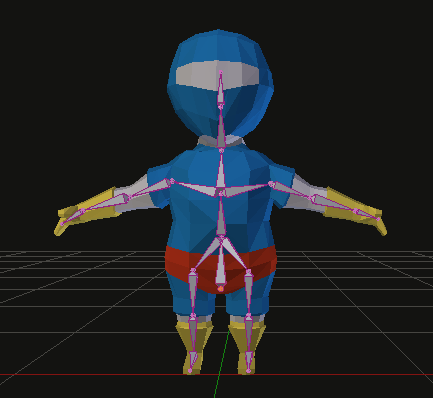
3D mesh and a bone armature

3D mesh and a bone armature

To animate a 3D model, the 3D model requires an armature. An armature is a set of 3D bones. Connecting the armature to the 3D model produces a parent to child linkage. In this instance, the armature is the parent, and the 3D model is the child.

Armature linked to the 3D mesh

Armature linked to the 3D mesh

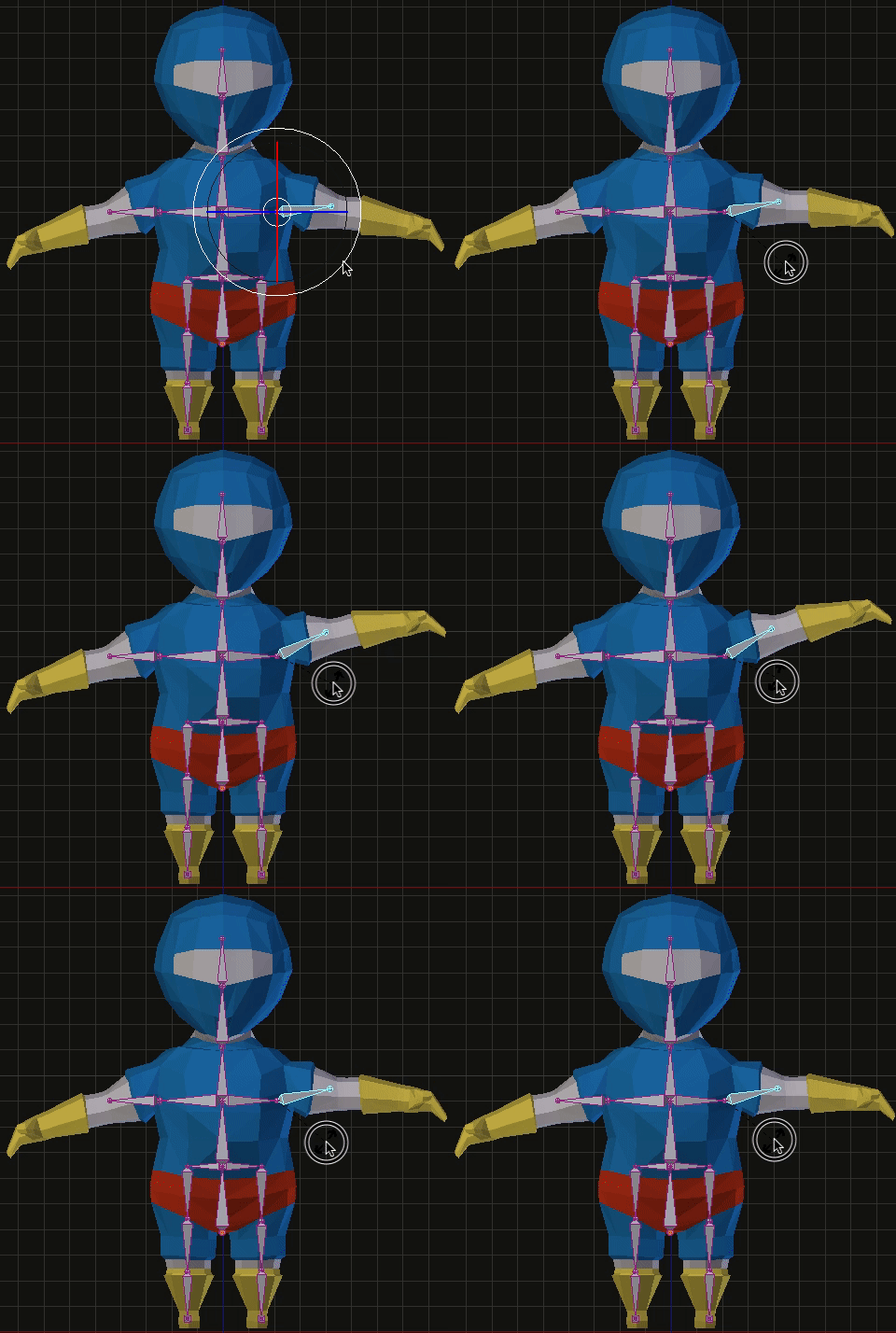
Bones influence the space coordinates of nearby vertices. For example, rotating the forearm bone, transform the space coordinate of all forearm vertices in the 3D mesh. How much influence a bone has on a vertex is known as a Vertex Weight.

Rotating a bone affects nearby vertices

Rotating a bone affects nearby vertices

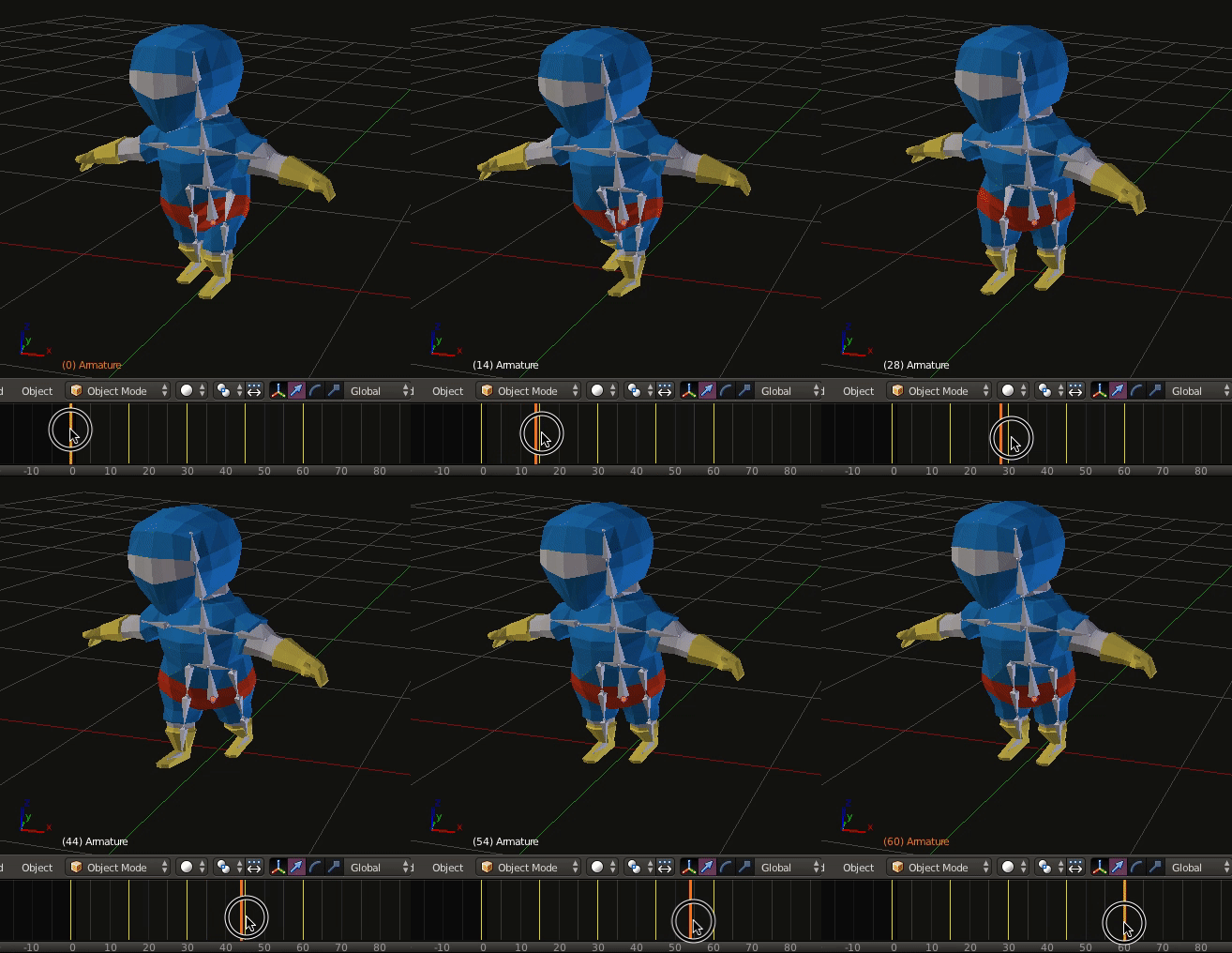
3D animations are composed of several keyframes. A keyframe stores the rotation and translation of every bone. As keyframes are played, the influence of bones on nearby vertices deforms the 3D model creating the illusion of an animation.

Animation with keyframes

Animation with keyframes

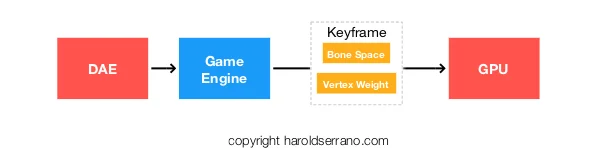
The data stored in keyframes and vertex weights are exported to the game engine using a Digital Asset Exporter (DAE). When a game engine runs an animation, it sends keyframe data to the GPU.

As the GPU receives the keyframe data, the bone's vertex weight and bone's space deforms the 3D model recreating the animation.

Game engine running an animation

Game engine running an animation

However, rendering only the keyframes received by the DAE may produce choppy animations. The game engine smoothes out the animation by interpolating the data in each keyframe. That is, it interpolates the bones' coordinate space between each keyframe.

Thus, even though a game artist may have produced only four keyframes, the game engine creates additional keyframes. So, instead of only sending four keyframes to the GPU, the game engine sends sixteen keyframes.

Hope this helps