Computing Defending Positions-Soccer Game v0.0.3

This month I worked on implementing a bit of intelligence into the soccer game. The AI system can now determine the best position for a player to receive a pass. Alternatively, the system can also determine the best defending positions to intercept a pass.

The video below shows these implementations:


Computing Passing Angles

Passing angles are important concepts in soccer. Players are always scanning their surroundings looking for passing angles to reach. Passing angles is also an important concept for the dribbling player. If the dribbling player can spot a good passing angle, the chances of scoring a goal increases.

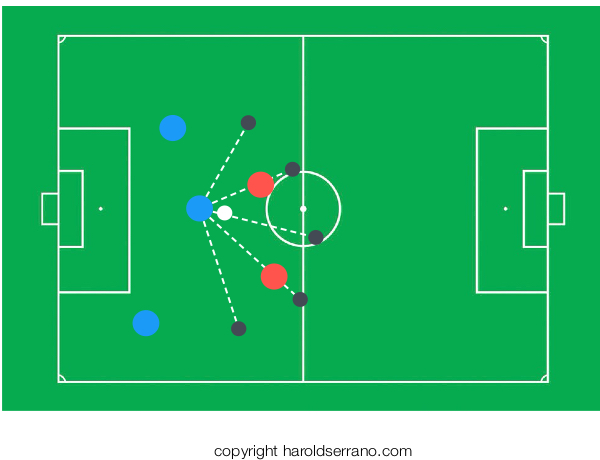
In the mobile game, I implement a method that scans 36 segments, each 10 degrees apart. Thus, forming a circle with the dribbling player at the center.

The system does interception tests of each segment against nearby players of the opposite team. If a segment intercepts one of these players, the segment is discarded as a passing angle. If it does not intercept a player, it is kept as a possible passing angle.

In the end, the system tries to select two segments whose angle with respect to the dribbling player is 45 degrees and 135 degrees, respectively.

The system then sorts the players closest to these segments and orders them to move to these passing angles.

Computing Defending Positions

Passing angles are not only important for a team who is in possession of the ball, but also for the defending team. As a defender, learning to read passing angles is crucial. And even more important is positioning yourself in a spot where you can intercept the pass.

The system determines defending positions by scanning the movement of the supporting players. And orders the defending players to move towards the passing angle. However, the defending players do not position themselves between the dribbling players and the supporting players. Instead, the defending players stand between the supporting players and the goal.

Determining a Time Interval

In a soccer game, players are constantly scanning for passing angles and defending positions. In a mobile game, the AI system scans for passing angles and defending positions at a set interval. There is no point in scanning for these items continuously.

The key is to find a balanced time interval to compute these elements. If you make the time interval too long, you will miss good passing angles and defending positions. If you make the time interval too short, you will make unnecessary computations; since players don't move around instantly.

Unfortunately, there is no formula to find the best time interval. The time interval to compute the passing angle and defending positions is determined through experimentation.

Thanks for reading

Implementing a State Design Pattern for an A.I. System

As you may know, I decided to develop a mobile soccer game using my game engine. The reason is quite simple. I want to test the features of the game engine and hopefully find as many bugs as possible.

Developing a mobile soccer game has introduced me to the world of Artificial Intelligence. Although I am not an expert in A.I., I have learned a valuable lesson; An A.I. system uses a state machine, and this state machine should be implemented as modular as possible.

State machines are taught using if-then or switch statements. Although such implementation is OK for small projects, it also leads to spaghetti code in complex projects.

A better way to implement a State Machine is with a Design Pattern known as State Pattern. The pros of using such pattern are that your State machine becomes modular and flexible. That is, you can remove or add as many States into your code without making it a chaotic mess.

Let me show you how to implement a State Pattern.

Note: You can download the project on my Github page so you can follow along.

Create an Abstract State Class

First, implement an abstract State class as shown below:

Abstract State Class
class StateInterface {

public:

    virtual ~StateInterface(){};

    virtual void enter(Player *uPlayer)=0;

    virtual void execute(Player *uPlayer, double dt)=0;

    virtual void exit(Player *uPlayer)=0;

};

The "execute" method will perform your "State" operations. The "enter" and "exit" methods are useful methods in an A.I. system. For example, you may have a 3D model that as it enters the "state", it waves his hand. Or it performs a goodbye gestures as it exits the "state."

Implement the concrete State Classes

Then, implement the concrete state classes. In this instance, let's implement a "Walking" and "Running" state class.

Walking State class
void WalkingState::enter(Player *uPlayer){

    std::cout<<"Player entering Walking State"<<std::endl;

}

void WalkingState::execute(Player *uPlayer, double dt){

    std::cout<<"Executing Walking State"<<std::endl;

}

void WalkingState::exit(Player *uPlayer){

    std::cout<<"Player exiting Walking State"<<std::endl;

}
Running State class
void RunningState::enter(Player *uPlayer){

    std::cout<<"Player entering Running State"<<std::endl;

}

void RunningState::execute(Player *uPlayer, double dt){

    std::cout<<"Executing Running State"<<std::endl;

}

void RunningState::exit(Player *uPlayer){

    std::cout<<"Player exiting Running State"<<std::endl;

}

As explained earlier, the "execute" method is the heart of your State operation. It is in this function where most of your logic resides. Moreover, this method will be called continuously until a change of state occurs.

You may notice that the States are implemented as Singletons. You don't have to implement the State classes as singletons, but I usually do.

Implement a State Manager

The State Manager class is responsible for changing the states and keeping track of previous states. This is shown in the snippet below:

State Manager Class
void StateManager::update(double dt){

    currentState->execute(player, dt);

}

void StateManager::changeState(StateInterface *uState){

    //keep a record of previous state
    previousState=currentState;

    //call the exit method of the existing state
    if (currentState!=NULL) {
        currentState->exit(player); 
    }

    //change state to new state
    currentState=uState;

    //call the entry method of the new state
    currentState->enter(player);

}

Before changing to a new state, the manager keeps a copy of the current state. It then calls the "exit" method of the current state. Changes to the new state and calls the "enter" method of the new state.

After the "changeState" method has completed, the manager enters the "update" method, where it continuously calls the "execute" method of the current state.

Putting it all together

Let's implement a simple class called "Player." This object will hold a pointer to the State Manager object. It will also contain a "changeState" and "update" method. Note that these methods delegate its operations to the State Manager member. See snippet below:

Player class
Player::Player(StateManager *uStateManager){

    stateManager=uStateManager;

}

Player::~Player(){
}

void Player::update(double dt){

    stateManager->update(dt);
}

void Player::changeState(StateInterface *uState){

    stateManager->changeState(uState);

}

Finally, let's put the State Pattern in action.

In the "main" function, let's create a state manager object, a player object and let's change the player object state as shown below:

main() Method
//Create a State manager object
    StateManager *stateManager=new StateManager();

    //Create a player object
    Player *player=new Player(stateManager);

    //Change the state of the object to a RUNNING state
    player->changeState(RunningState::sharedInstance());

    //call the update method
    player->update(1.0);

    //Change the state of the object to a WALKING state
    player->changeState(WalkingState::sharedInstance());

    //call the update method
    player->update(1.0);

When you run the project, the output window will show the player entering, executing and exiting the state as shown below:

  • Player entering Running State
  • Executing Running State
  • Player exiting Running State
  • Player entering Walking State
  • Executing Walking State

If you want to add a new state, you simply create a new state class, without having the need to modify the if-then/switch statements commonly used in state machines.

State Patterns make the implementation of a state machine very flexible, modular and clean. If 100 years from now, you need to add more states to your project, you won't have to modify the inner workings of your application. Instead, you just create new state classes.

Hope this helps

Should you start a technical blog?

I started this blog on Dec 2014. I've been writing for about two years (and some months) and have published about 190 articles. I think I have enough experience to comment if you should or shouldn't start a technical blog.

First, let me start off with the harsh aspects of blogging.

Writing Consistently

The hardest part of blogging is making writing a habit. I love writing, but I must confess that writing regularly has been quite a challenge. There are times when an influx of writing energy flows through me that I end up writing a post a day. Other times, I go weeks or months without writing a single post. I used to fight this writing drought by forcing myself to write, but I realized that writing is like music. When it comes, it comes; there is no point in pushing it.

No rewards for a long time

This past January I got about 3.5K visits. That is the highest number of visits I've ever gotten in a month. However, during the first year, my average number of visitors was less than 20 a day.


Be prepared to write and have no one read your articles. This fact brings me to an important point; your purpose should be to HELP readers, not be concerned about your blog stats.

If helping your readers, even if it is only one, brings you satisfaction, then blogging is for you. Else, do yourself a favor and find another hobby.

Now, let me share the positive of having a blog.

Your writing will improve

Writing is a skill. You need to practice it to improve it. Blogging is the perfect stage to practice this skill. I have noticed a huge improvement in my writing. If you go back to my articles written around 2015 and compare them to recent articles, you will see improvements; not only in clarity but also grammatically.

You get to help people

Helping others is the one reason that makes blogging worthwhile. I feel an enormous sense of satisfaction every time I get a message from a reader thanking me for a post or asking for advice. This type of satisfaction is hundred times more rewarding than seeing your blog stats improve. A "Thank-You" message from readers like you, makes all the trouble of writing an article worth it.

You will become an expert

It is interesting how cracks in your understanding of a topic emerge once you start teaching others. As a matter of fact, It was writing that improved my understanding of game engine development and allowed me to complete my project.

I modified the engine's architecture several times after writing an article. Writing and teaching solidified my understanding and gave me ideas how to improve the engine. Teaching, not coding, enhanced my computer graphics knowledge.

So, should you start a technical blog?

If your goal is to express yourself through writing and you have an honest desire to help others, then blogging will be rewarding. However, if your goal is to make money like some bloggers have been able to, then be aware that the money will not come that easily and it may take a while.

Enabling communication among players -Soccer Game v0.0.2

Developing a soccer video game has been more fun that I thought it would be. It has also been harder than I expected. Aside from coding, the part of development that has taken me time is creating the animations. I have done my best to create several animations that mimic a player movement on the field. As of today, I have created 21 animations and counting.

This month, I focused on developing a State Design Pattern and a messaging system for the AI. As the video below shows, the players can now communicate among themselves and be alerted whenever the ball is being passed to them.


State Design Pattern

State machines are taught using if-then or switch statements. Although such implementation is OK for small projects, it also leads to spaghetti code in complex projects.

A better way to implement a State Machine is with a Design Pattern known as State Pattern. The pros of using such pattern are that your State machine becomes modular and flexible. That is, you can remove or add as many States into your code without making it a chaotic mess.

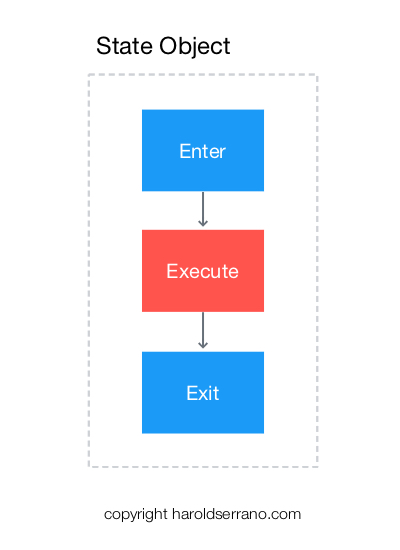
Thus, instead of using a switch statement to implement a state machine, you use classes to represent a state object. Below is an illustration of the State Object:

Every state object contains an enter, execute and exit methods.

The enter and exit methods are useful methods in an A.I. system. For example, you may have a 3D model that as it enters the "state," it waves his hand. Or it performs a goodbye gestures as it exits the "state."

Let's see how this works:

Assume that the player is in an idle state; it is just standing on the field waiting to change from an idle to dribbling state.

When the player changes to a "dribbling" state, the "enter" method is called. The "enter" method plays the dribbling animation.

The "execute" method is then called in a continuous loop. In our instance, the player keeps dribbling the ball, until a message is sent to change state.

When the player receives a message to change state, the "execute" method is stopped, and the "exit" method is called. The "exit" method ends the dribbling animation.

Here is an illustration of the process mentioned above:

State Manager

A soccer player requires several State Objects. For example, every player needs a running, passing, dribbling and marking state. A State Manager class is required to manage all these state objects.

The state manager is responsible for changing the state of the player, and for keeping track of the previous state. The State Manager is also responsible for calling the "enter," "execute" and "exit" methods in the appropriate order.

For example, when a player changes states, the State Manager calls the "exit" method of the current State object. It then calls the "enter" and "execute" methods of the new State object.

State Manager.jpeg

Messaging System

An AI system requires a messaging system to allow objects to communicate. For example, the player dribbling the ball can alert a nearby player of an incoming pass.

However, players don't receive these messages directly. Instead, the messages are received by the players' state objects.

Thus, aside from implementing an "enter," "execute" and "exit" methods, each state object also implements a "receiveMessage" method. The "receiveMessage" method acts upon the message received. For example, it can ask the player to change to a new state, or if the message is not appropriate for the current state, it ignores the message.

In the video above, when the button is pressed, a message is sent to the dribbling player with a request to pass the ball. The player changes states from dribbling to Passing state. Then another message is sent to the nearby player most likely to receive the ball.

How I managed to develop a game engine?

Recently I was analyzing how I was able to develop a game engine. It was a complex project which took approximately 15,330 hours. All in all, the basic framework of the engine took about three years to complete. So, how was I able to complete such enormous task?

I turned coding into a habit

Developing a game, app or a game engine can turn into a chaotic process if you don't break it down into simple tasks. And it can become overwhelming if you try to code things all at once. For example, the hardest part of a game engine is developing the physics engine. There are so many moving parts in a physics engine that can overwhelm anyone.

I manage this complex project by doing the following: For a particular feature of the engine, I would write down which Class I should implement. Then, I would write down all the methods/functions necessary for the Class. Then, instead of saying: "Today, I will implement Class X," I would instead focus on implementing ONLY one method/function a day. The key here is that I trained my brain to code every day. Even if I coded for only 15 mins, I still showed up to code every day.

By the second year of development, coding had become a lifestyle for me; just like working out and eating healthy is to me. The day I didn't code, it felt awkward. And I would find myself coding even if I wasn't planning to do so.

I used pen and paper before coding

I learned that using pen and paper before coding can save you hours of development. The first iteration of the engine was a total mess. I ended up throwing it into the trash can. The second time around, I started sketching the game engine operations, methods, classes on paper way before I started to code.

Nowadays, if I'm about to implement a method/function, I usually draw a sketch of its operation and how it may affect other parts of the engine. Having a sketch of what you are about to implement not only saves you hours of work, but it can help you avoid bugs which you may be introducing into your app unconsciously.

I used the power of visualization

You may think this is crazy, but trust me, it works. Visualizing the finish line is the most useful thing if you want to achieve your goals.

It took me about a year to implement the Collision Detection System of the engine. As I implemented the collision detection features, I would visualize the features working way before they were completed. For example, instead of me saying, "I'm implementing the GJK algorithm" I would say to myself "I'm DONE implementing the GJK algorithm" and I would visualize 3D objects colliding on the screen.

Call me crazy, but for some reason visualizing the finish line way before you cross it is a powerful tool. It worked for me, who knows it may also work for you.

Hope these tips can be of use to you.