Good-bye Git GUI. Hello Git terminal (well, kind of)

When I started as an indie-developer, performing Git operations through a graphical interface was ideal. However, lately I have realized how much the GUI has held me back.

I'm not saying that using a Git GUI is a bad practice. Not at all. If you are a new developer, your focus should be in learning a new programming language and the proper way to develop an app. You shouldn't spend time learning EVERY Git operation. You have enough on your plate to be learning how to rebase, revert, etc. In this instance using a Git GUI can be helpful.

Using Git through a GUI

Using Git through a GUI

However, as you grow as a developer, a GUI becomes a roadblock more than a valuable tool. I started noticing this in the last beta version of my game engine. In the back of my head, I knew it was time to start using the terminal. I also knew that my basic Git knowledge was insufficient to further the development of the engine.

This past weekend I decided to spend my free time learning Git commands. I decided to revisit every git command I knew and visualize what it does. I also learned new Git commands. Since I am a visual learner, these tools helped a lot:

To be completely honest, I have been intimidated by the terminal for quite a while. I was afraid that I was going to issue the wrong Git command and completely mess up my game engine. However, that feeling has changed. Now that I can visualize what each command does, the terminal does not scare me anymore. It sounds funny that I say this, but through the terminal, I feel the power in my hands. (Yeah, it does sound weird.)

Using Git through the terminal

Using Git through the terminal

However, I can't completely say Good-bye to the Git GUI. Unfortunately, the Git terminal is terrible at graphing branch dependencies (see image below) and showing diffs between files. Nonetheless, I see myself executing all Git commands through the terminal, and whenever I need a visual, I will use the Git GUI.

Git log graph output

Git log graph output

My workflow and the tools I use have changed over time. When I started as a developer, I could not understand why someone would prefer the terminal over the GUI. Years later, I realized that it was advantageous to comprehend Git operations from a terminal perspective. And even though I took the time to learn the basics of Git using the terminal, my preferred choice was the GUI. Today, as the engine has become more involved, I realize that is time to say "Hello" to a tool that intimidated me in the beginning.

My advice to all new developers is this: If you are content using a Git GUI, keep on using it (but do learn the basics). If you are intimidated by the terminal, don't force yourself to use it yet. As your knowledge grows and you develop complex applications, you will realize the shortcomings of a GUI. The best learning occurs when you are curious. And your curiosity to perform various Git operations will remove the intimidation you may have with the terminal.

Hope this helps.

How many books does it take to develop a game engine?

Approximately this many:

No kidding!

Understanding the basic concepts of OpenGL

In my opinion, what makes OpenGL complicated to grasp is that you need to understand two different concepts simultaneously. When you read an OpenGL book, you are introduced to the OpenGL API. The OpenGL API is the linkage between your application and the GPU. You are also introduced (in later chapters) to OpenGL Shaders and to the OpenGL Shading Language. Shaders are small programs in the GPU that informs the GPU how to render.

In other words, not only do you need to know how to send data to the GPU. You also need to know how to write a program that a GPU can understand.

To help you with OpenGL, in this post, I provide answers to the most important OpenGL concepts that you need to understand.

I hope you find it useful.

What is OpenGL?

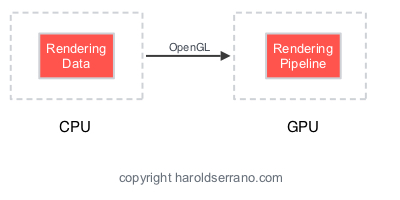
OpenGL is an API for drawing graphics. Its purpose is to transfer data from the CPU to the GPU.

How is data transferred to the GPU?

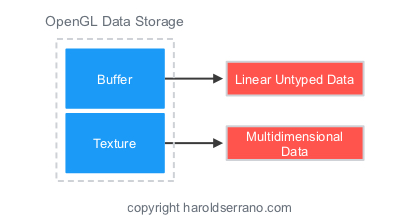
Data is transferred to the GPU with objects known as OpenGL Buffers.

What is a Buffer?

A buffer is a linear block of untyped data. Think of it as generic memory allocation.

Can a buffer store multidimensional data?

No. Data storage used for multidimensional data, such as images, are known as Textures.

What is a Vertex Attribute?

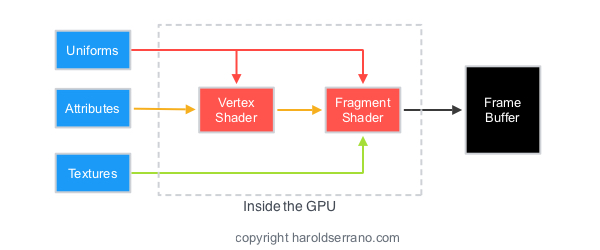
The input variable to a Vertex Shader.

What is a Vertex Shader?

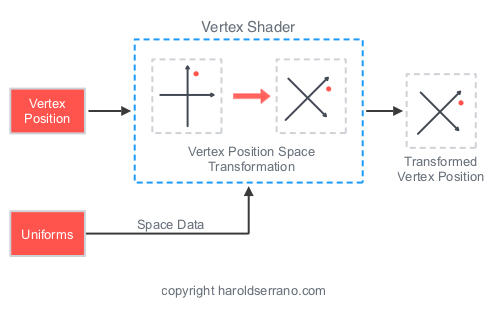
The Vertex Shader is responsible for computing and passing forward the coordinates of a model to the Fragment shader.

How does the Vertex Shader receives data?

The mechanism for getting data in and out of a shader is to declare them as in or out storage qualifiers. When you declare a variable as in, it marks it as an input to the vertex shader. This sets the variable as an input to the graphics pipeline.

What is a Fragment Shader?

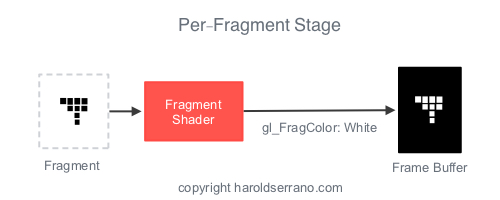
The basic operation of a fragment shader is to provide a color to each pixel. More specifically, the fragment shader takes the output from the rasterizer and computes the color of the pixel for each fragment.

What is the difference between Vertex Attribute vs. Uniform?

A Vertex Attribute can only be received by a Vertex Shader. A Uniform is data that can be received by any shader: Vertex, Tessellation, Geometry and Fragmet.

What is a Target?

A target is also known as Binding Point in OpenGL. A target determines the type of an object. Just like int or float determines the memory allocated for a variable in C++, a target determines the behavior of an object.

What is a Texture Object?

A Texture Object is an OpenGL object which contains texture data.

What is a sampler?

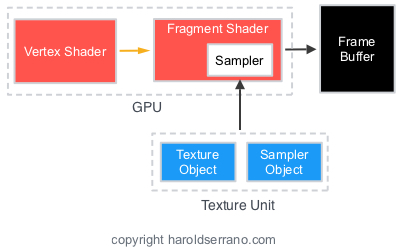
A Sampler represents a texture and sampling parameters in a shader.

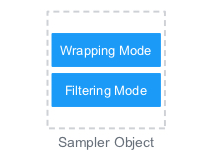
What is a Sampler Object?

A sampler object stores the Wrapping and Filtering parameters that control a texture.

What is a Texture Unit?

A texture unit contains a Texture Object and a Sampler Object.

What is Texture Filtering?

It is the process of calculating color fragments from a stretched or shrunken texture map.

What is Magnification/Minification?

Stretching a texture is known as Magnification. Shrinking a texture is known as Minification.

How do you integrate a Vertex & Fragment Shader into your application?

Before your Vertex and Fragment shader programs can be integrated into your application, you must perform the following steps:

  1. Create one or more shader objects by using glCreateShader.
  2. Provide source code for these shaders by calling glShaderSource.
  3. Compile each of the shaders with glCompileShader.
  4. Create a program object by calling glCreateProgram.
  5. Attach the shader objects by calling glAttachShader.
  6. Link the program object by calling glLinkProgram.
  7. To use the program object as part of OpenGL’s current state call glUseProgram.

I hope these questions and answers were helpful.

Game character modeling for game engine developers

For the past week, I have been working on a demo for the game engine. I have not written a single line of code. Instead, I have been modeling game characters and game environments for the demo.

Contrary to what you may believe, game engine development requires some artistic skills. As someone who has been doing this for the past three years, I can say that game engine development is 75% coding, 25% game asset modeling.

I learned this fact the hard way. In the beginning, I bought game characters and tried to render them with my primitive engine. It didn't go so well and spent hours trying to figure out the problem. Against my will, I was forced to learn 3D modeling tools such as Blender. As I learned 3D modeling techniques, Computer Graphics concepts started making sense. As a result, I was able to improve the engine and know its limitations.

There are plenty of 3D modeling tutorials, videos, etc., online. Unfortunately, their target audience is game-artist students. As an engineer, it was a bit hard to follow. The other issue that I encountered is that these tutorials don't focus on low-polygon characters. Instead, they focus on high-polygon characters which mobile devices can't handle. This is a problem since my game engine targets mobile devices.

Recently I found three amazing low-polygon modeling tutorials written by Karan Shah.

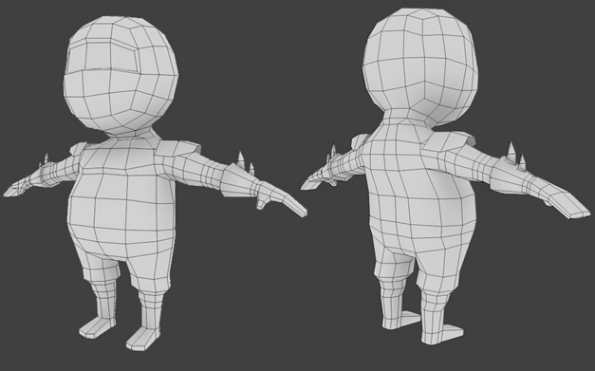
Karan teaches you, step by step, how to model a low-polygon character. (I'm currently using this modeling techniques in the second engine demo.)

Modeling a low polygon character

Modeling a low polygon character

Karan also shows you how to unwrap a character and add texture to it.

Unwrapping a low polygon character

Unwrapping a low polygon character

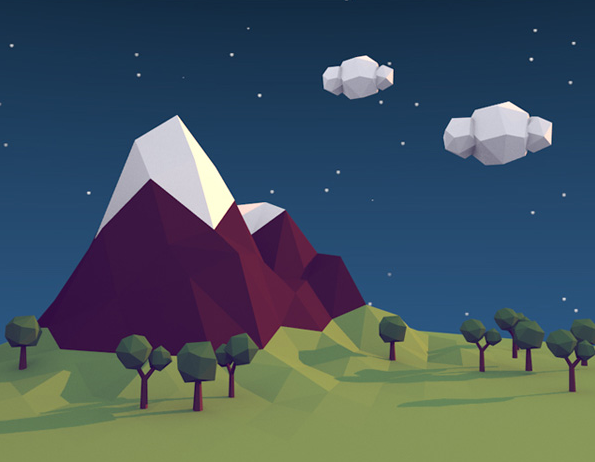
Finally, my favorite tutorial is where he shows you how to model a low-polygon game scene. I ended up using his techniques in the first engine demo.

Modeling a low polygon scene

Modeling a low polygon scene

I hope these tutorials helps you as much as they helped me.

I wish I had found these tutorials when I started developing the engine.

Understanding Git commands visually

In the next six months, I'm planning to release the engine as an Open Source project.

Am I excited? Hell Yeah!

Am I prepared? No! The game engine will be my first open source project.

There are so many things I don't know about managing an open source project. Technically, I think I will do OK. Management-wise, I have no idea. I ended up buying this book from Amazon: Producing Open Source Software. Hopefully, it helps.

To manage an Open Source project (I believe) you need to have strong Git skills. I don't feel that I do. Of course, I know the familiar commands like add, commit, checkout, merge. But I don't know it good enough to manage an open source project.

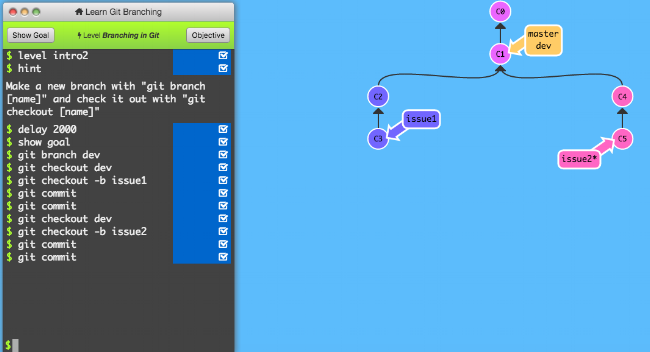
The best way I learn is through visuals and hands-on. Luckily, I found two fantastic sites that teach Git visually and interactively. I have played around with their tutorials for about three days, and they have helped a lot.

The first site is by Wei Wang. The site has an interactive terminal, and after typing a Git command, you get to see Git in action.

The second site is LearnGitBranching. It is very similar to Wei Wang site, but it has more tutorials, more Git commands, and nicer visuals.

If you are a visual learner, you need to check out these sites. I believe you will learn a lot from these sites.